trckable documentation
Lightweight, privacy-first web analytics you host yourself — and it tells you which traffic pays. Everything here is free; nothing is held back.
trckable is a single binary. It serves the browser script, the dashboard and the API, keeps its own data on one volume, and needs no database next to it. There is one edition and every feature is in it.
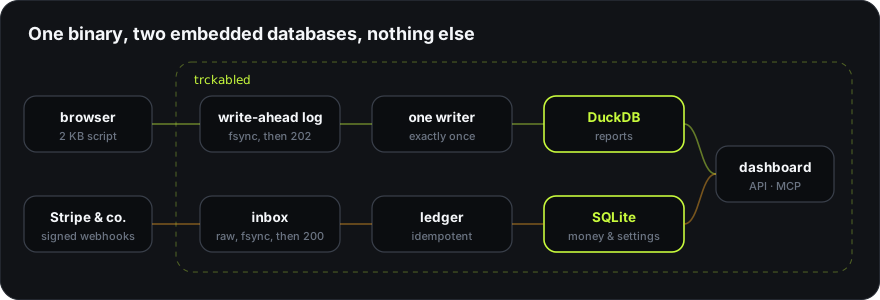
Two things shape every decision in this product:
- Lightweight. A script of about 2 KB, a 29.7 MB image, 55 MB of memory when idle. The budgets are checked in CI, and the benchmarks say how each number is measured.
- Privacy-first. No IP address is ever stored — not in a log, not in the database. Nothing is loaded from another company. There is no telemetry to turn off.
Where to start
| If you want to | Read |
|---|---|
| See numbers in the next five minutes | Quick start |
| Put the script on a site | Install |
| Run it on your own server | Self-hosting |
| Understand what a card means | Reports |
| Connect Stripe or another provider | Revenue |
| Answer a question about cookies | Privacy and consent |
| Read your data from somewhere else | API and MCP |
| Move from another tool | Migrating |
What trckable does not do
Session replay, heatmaps, A/B testing and tag management are out of scope on purpose — they are what makes analytics heavy. If you need those, Matomo does them well. This is stated here rather than discovered later.
The words this documentation uses
| Word | Means |
|---|---|
| Site | One domain you track. Each has an id like tkb_a1b2c3d4 |
| Core | The dashboard's calm screen: the numbers and nothing else |
| Full | The same page with every number, opened with F |
| Module | A feature you switch on per site. Off costs nothing at all |
| Goal | Something you marked as worth counting — a signup, a download |
| Channel | Where a visit came from: Search, Social, AI assistants, Paid… |